


Configuration Wizard
The configuration wizard automatically detects your device by connecting to it and reading its firmware settings. It creates a fully configured machine profile in seconds, eliminating manual setup.
Starting the Wizard
- Open Settings → Machines and click Add Machine
- In the profile selector, click Other Device… at the bottom
This opens the wizard. It does not require a pre-existing device profile — the wizard builds one from scratch by probing the connected hardware.
Connect
The first page asks you to select a driver and provide connection parameters.
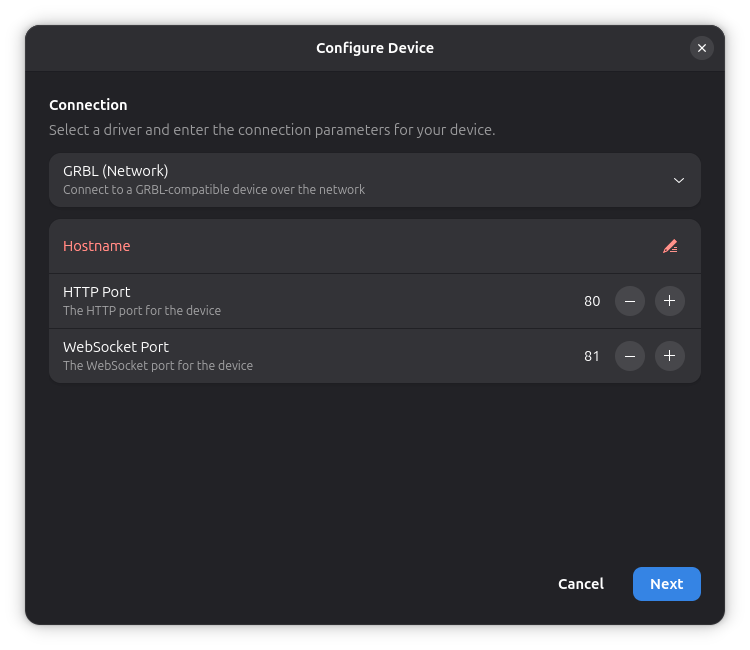
Driver Selection
Choose the driver that matches your device's controller. Only drivers that support probing are listed. Typically:
- GRBL (Serial) — USB-connected GRBL devices
- GRBL (Network) — WiFi/Ethernet GRBL devices
- Marlin (Serial) — USB-connected Marlin devices
Connection Parameters
After selecting a driver, fill in the connection details (serial port, baud rate, host, etc.). These are the same parameters used in General Settings.
Click Next to start probing.
Discover
The wizard connects to the device and queries its firmware for configuration data. This includes:
- Firmware version and build info (
$I) - All firmware settings (
$$) - Axis travel distances, speeds, acceleration, and laser power range
This step typically completes within a few seconds.
Review
After a successful probe, the review page shows all discovered settings. Everything is pre-filled but can be adjusted before creating the machine.
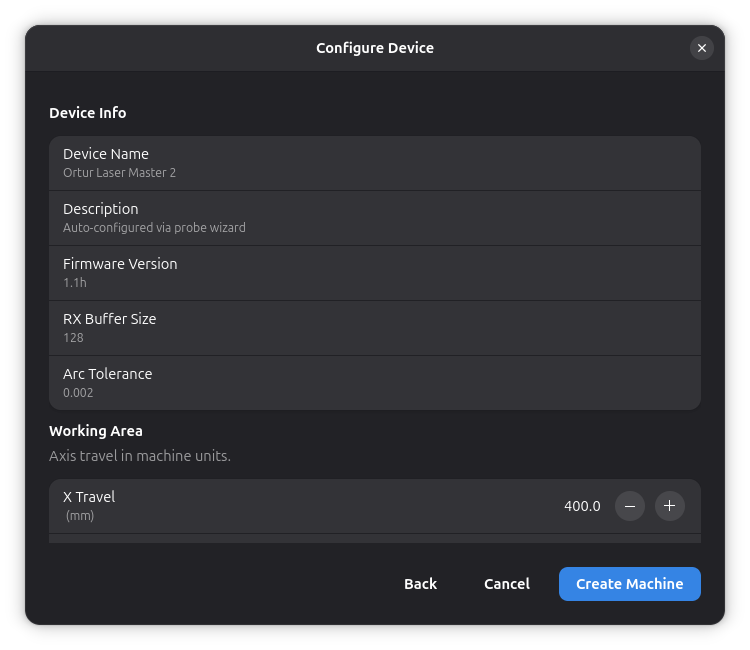
Device Info
Read-only information detected from the firmware:
- Device Name — extracted from the firmware build info
- Firmware Version — e.g.
1.1h - RX Buffer Size — serial receive buffer size
- Arc Tolerance — firmware arc interpolation tolerance
Working Area
- X Travel / Y Travel — maximum axis travel in machine units,
read from firmware settings
$130and$131
Speed
- Max Travel Speed — from the lower of
$110and$111 - Max Cut Speed — defaults to the same as travel speed; adjust as needed
Acceleration
- Acceleration — from the lower of
$120and$121, in machine units per second squared
Laser
- Max Power (S-value) — from firmware setting
$30(spindle max)
Behavior
- Home on Start — enabled if firmware homing (
$22) is on - Single-Axis Homing — enabled if the firmware was compiled with
the
Hflag
Warnings
The wizard may display warnings about potential issues, such as:
- Laser mode not enabled (
$32=0) - Device reporting in inches (
$13=1)
Creating the Machine
Click Create Machine to finalize. The wizard emits the configured profile and the normal machine creation flow continues — the Machine Settings dialog opens so you can make further adjustments.
Limitations
- The wizard only works with drivers that support probing. If your driver is not listed, use a pre-built profile from the selector instead.
- Probing requires the device to be powered on and connected.
- Some firmware settings may not be readable on all devices.
See Also
- General Settings — manual machine configuration
- Device Settings — reading and writing firmware parameters on an already-configured machine
- Adding a Machine — overview of the machine creation workflow