


Maintenance
The Maintenance page in Machine Settings helps you track machine usage and schedule maintenance tasks.
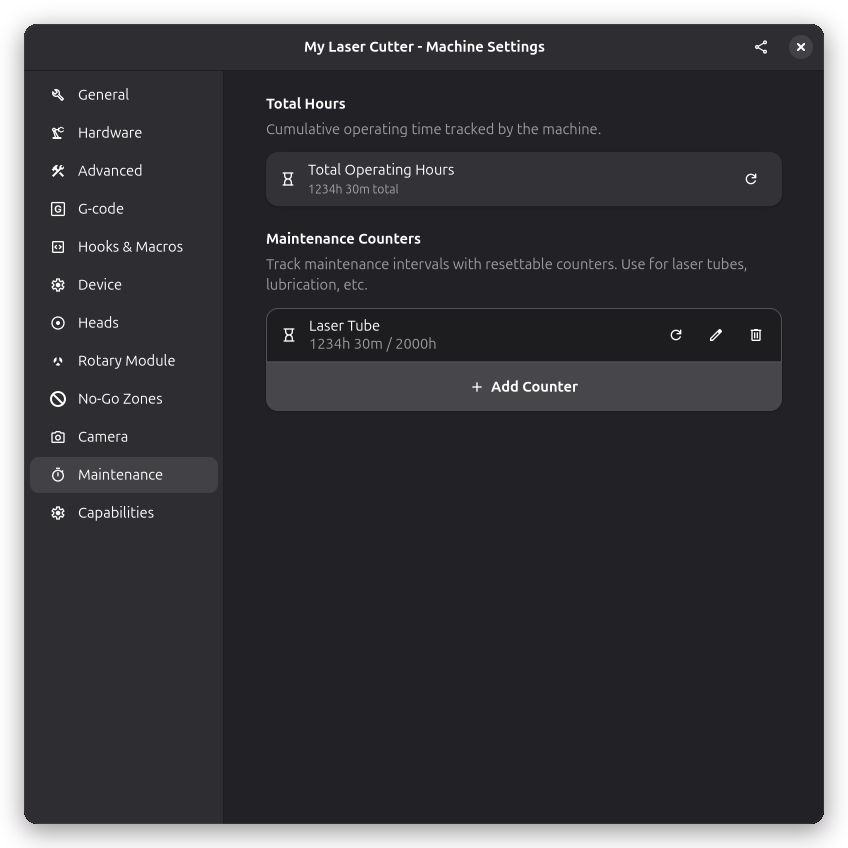
Usage Tracking
Rayforge tracks how long your machine has been in use. This information helps you schedule preventive maintenance at appropriate intervals.
Total Hours
The total hours counter tracks all time spent running jobs on the machine. This cumulative counter cannot be reset and provides a complete history of machine usage.
Use this to track overall machine age and plan major service intervals.
Custom Maintenance Counters
You can create custom counters for tracking specific maintenance intervals. Each counter has a name, tracks hours, and can be configured with a notification threshold.
Creating a Counter
- Click the add button to create a new counter
- Enter a descriptive name (e.g., "Laser Tube", "Belt Tension", "Mirror Cleaning")
- Set a notification threshold in hours if desired
Counter Features
- Custom names: Label counters for any maintenance task
- Hour tracking: Automatically accumulates time during job execution
- Notification thresholds: Get reminded when maintenance is due
- Reset capability: Reset counters after performing maintenance
Example Counters
Laser Tube: Track CO2 tube hours to plan replacement (typically 1000-3000 hours). Set a notification at 2500 hours to plan ahead.
Belt Tension: Track hours since last belt tensioning. Reset after performing the maintenance.
Mirror Cleaning: Track usage since last mirror cleaning. Reset after cleaning.
Bearing Lubrication: Track hours for bearing maintenance intervals.
Resetting Counters
After performing maintenance, reset the relevant counter:
- Click the reset button next to the counter
- Confirm the reset in the dialog
- The counter returns to zero
Common maintenance intervals:
- Daily: Clean lens, check mirror alignment
- Weekly: Clean rails, check belt tension
- Monthly: Lubricate bearings, check electrical connections
- Yearly: Full inspection, replace worn parts
Adjust intervals based on your usage patterns and manufacturer recommendations.
See Also
- Laser Settings - Laser head configuration
- Hardware Settings - Machine dimensions