


Constraints
Constraints are the rules that hold a sketch together. Each one is a small statement about the geometry — "these two points are one and the same", "this line is exactly 80 mm long" — and after every edit the solver rearranges the sketch so that all statements hold at once. Geometry without constraints is free to drift; every constraint you add pins one degree of freedom down.
There are two families. Geometric constraints capture relationships that carry no measurement: coincidence, horizontality, tangency, symmetry. Dimensional constraints attach a number to the geometry: a distance, a radius, an angle. Dimensional values accept expressions (see below), which is where the "parametric" in parametric sketching happens.
The solver reports its state through colors. Geometry held by constraints is drawn green, unconstrained points black, and a fully constrained sketch turns the green darker. Valid constraint markers are green, expression-based markers orange, and markers of constraints the solver cannot satisfy turn red (see conflicts).
Adding a constraint
Select the geometry the constraint should apply to, then either press the keyboard shortcut or pick the constraint from the pie menu — geometric constraints live in the Constrain group, dimensional ones in the Dimension group. Each constraint demands a particular selection:
| Constraint | Select | Shortcut |
|---|---|---|
| Horizontal / Vertical | 2 points, or any lines | H / V |
| Coincident / Point on Shape | 2 points, or a point + a shape | O or C |
| Perpendicular | 2 shapes | N |
| Tangent | 1 line + 1 arc or circle | T |
| Symmetry | 3 points, or 2 points + 1 line | S |
| Equal Length | 2 or more shapes | E |
| Distance | 2 points, or 1 line | K+D |
| Diameter | 1 circle | K+O |
| Radius | 1 arc or circle | K+R |
| Angle | 2 lines | K+A |
| Aspect Ratio | 2 lines | K+X |
The order of a selection never matters, with one exception: with three selected points, Symmetry uses the last point as the mirror center. A shortcut only fires when the current selection fits the constraint — everything else is filtered out of the pie menu as well.
Constraints also appear on their own while you draw: snapping to an endpoint creates a coincident constraint, and alignment guides become horizontal or vertical ones (see the sketcher overview).
Geometric constraints
A coincident constraint merges two distinct points into one location. Select the two points and both are pulled together; the marker is a ring around the joined point. Drawing a line that ends exactly on an existing endpoint creates this constraint automatically.

Horizontal and Vertical rotate the selected line, or the pair of selected points, onto an axis. The markers are small bars — horizontal and vertical respectively — drawn next to the geometry.


Perpendicular forces two shapes to meet at a right angle. It works for two lines, a line and an arc or circle, or two arcs and circles. The marker is a right-angle arc at the intersection.

Tangent smooths the transition where a line meets an arc or circle: the line is rotated to touch the curve without crossing it. Its marker is a small "T" at the point of contact.

Point on shape pins a point onto a line, arc, or circle — without merging it with any particular point the way coincident does. Select a point and a shape; the marker is a ring around the constrained point. When the shape is a curve (bezier), the point is constrained to slide along it.

Symmetry mirrors two points across a center or an axis, and comes in the two modes already mentioned: select three points and the last one becomes the center the first two mirror around, or select two points and a line to mirror across that line. The marker is a pair of opposing arrowheads at the midpoint between the mirrored points.

A seventh geometric constraint, collinear, forces points onto one infinite line. It has no on-canvas marker and cannot be applied by hand — the chamfer and fillet tools create it to keep the modified corner aligned.
Dimensional constraints
The distance constraint fixes the gap between two points, or the length of a line. Its label shows the current value at the middle of the measured span; when the two points are not already joined by a line, a dashed leader line makes clear what is being measured.

Circles and arcs get their own dimensions. Diameter labels the full width of a circle with a Ø
prefix, radius labels the distance from an arc's or circle's center with an R prefix, and both
place the label just outside the shape with a short leader.


The angle constraint sets the angle between two selected lines. It draws an arc between the two directions at their intersection, labeled with the value in degrees.

Aspect ratio ties the lengths of two lines together: the length of the first divided by the length of the second must equal the given value. Its marker, a pair of opposing corner brackets, sits at the junction where the lines meet.

Finally, equal length applied to two or more lines, arcs, circles, or ellipses makes them all
share one length or radius, marking each shape with an = sign. The solver also uses an
equal-distance variant of this constraint internally — for example to keep a circle round or the two
sides of a chamfer symmetric — which carries the same = marker but cannot be applied by hand.

Editing dimensional values
Double-click the label of a dimensional constraint to edit it. The dialog accepts a plain number or
an expression: sketch parameters and input variables can be referenced by name, and math functions
are available — a radius of width/2 tracks the width parameter wherever it goes. Once a constraint
is driven by an expression, its marker turns orange as a reminder that the number is computed, not
typed. The full syntax, together with the sketch parameters it can reference, is described in
Parameters and Expressions.
Double-clicking a not-yet-dimensioned line, arc, or circle offers to create the matching dimension directly (distance, radius, or diameter).
Selecting and deleting
Constraint markers participate in selection like everything else: hover shows a yellow highlight and
a tooltip with the constraint's name, and a click selects it, drawing it in blue. Pressing Delete
removes the selected constraint and releases whatever geometry it was holding. Deleting geometry
takes its constraints along with it. For dimensional constraints the edit dialog described above has
no delete button — removing a dimension is a normal delete of the selected marker.
When constraints conflict
Constraints that contradict each other — a triangle whose sides cannot all be true at once, say — cannot break the sketch: the solver does its best and flags what it could not satisfy. Conflicted constraints turn red, both their markers and the geometry they hold, so the damaged area is visible at a glance.
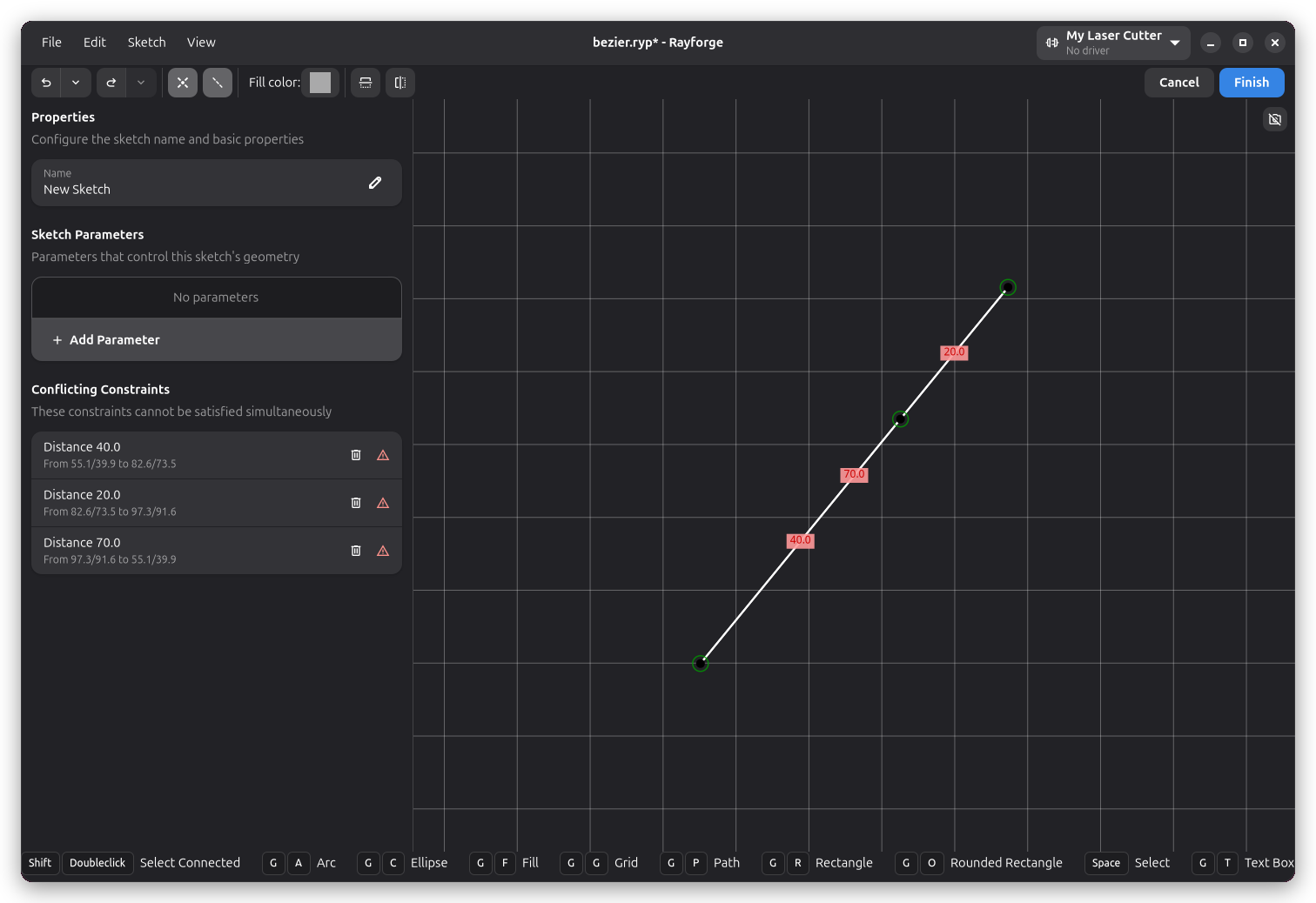
The sidebar lists every conflict under Conflicting Constraints, each row naming the constraint and the points it touches. The rows are interactive: hovering one highlights the constraint on the canvas, clicking one selects it, and the delete button on the right removes it. Typically the fastest way out of a conflict is to delete or re-value the constraint that expresses the outdated intent — the list exists precisely because the solver cannot guess which of the contradicting rules is the wrong one.
Where to go next
Each drawing tool is documented on its own page — see Path, Arc and Ellipse, and Rectangle for how to draw the shapes these constraints attach to.