


Deepnest
Deepnest automatically arranges your workpieces into a compact layout on your stock material or machine work area. It uses a genetic algorithm to find an efficient packing of shapes, minimizing waste and fitting more parts onto each sheet.
Prerequisites
Select one or more workpieces on the canvas before running nesting. You can also select stock items to define the sheet boundaries. If no stock is selected, the addon uses the document stock or falls back to the machine work area.
Running the Nesting Layout
Trigger the nesting layout from the Arrange menu, the toolbar button, or the keyboard shortcut Ctrl+Alt+N. A settings dialog opens before the algorithm runs.
Nesting Settings
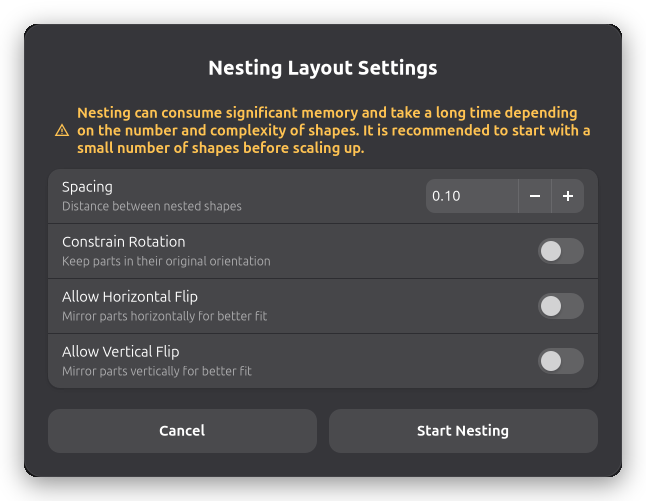
The settings dialog offers the following options before the nesting algorithm begins.
Spacing sets the distance between nested shapes, in millimeters. The default value is taken from your machine's laser spot size. Increase this value to add a safety margin between parts.
Constrain Rotation keeps all parts in their original orientation. When this is off, the algorithm rotates parts in 10-degree increments to find a tighter fit. Leaving rotation unconstrained produces better material usage but takes longer to compute.
Allow Horizontal Flip mirrors parts horizontally during nesting. This can help fit parts more tightly, but the resulting cuts will be mirrored.
Allow Vertical Flip mirrors parts vertically during nesting. The same consideration about mirrored output applies.
Click Start Nesting to begin. The dialog closes and the algorithm runs in the background. A progress indicator appears in the bottom panel while nesting is in progress.
After Nesting
When the algorithm finishes, all workpieces on the canvas are repositioned to their nested locations. The positions are applied as a single undoable action, so you can undo the layout with one step if the result is not what you need.
If the algorithm could not fit all workpieces onto the available stock, the unplaced items are moved to the right of the stock area so they remain visible and easy to identify.
If the nesting result is worse than the original layout — for example, the parts already fit well — the workpieces remain in their original positions.
Related Topics
- Stock Handling - Define stock material for nesting
- Workpiece Positioning - Position workpieces manually