


AI Provider
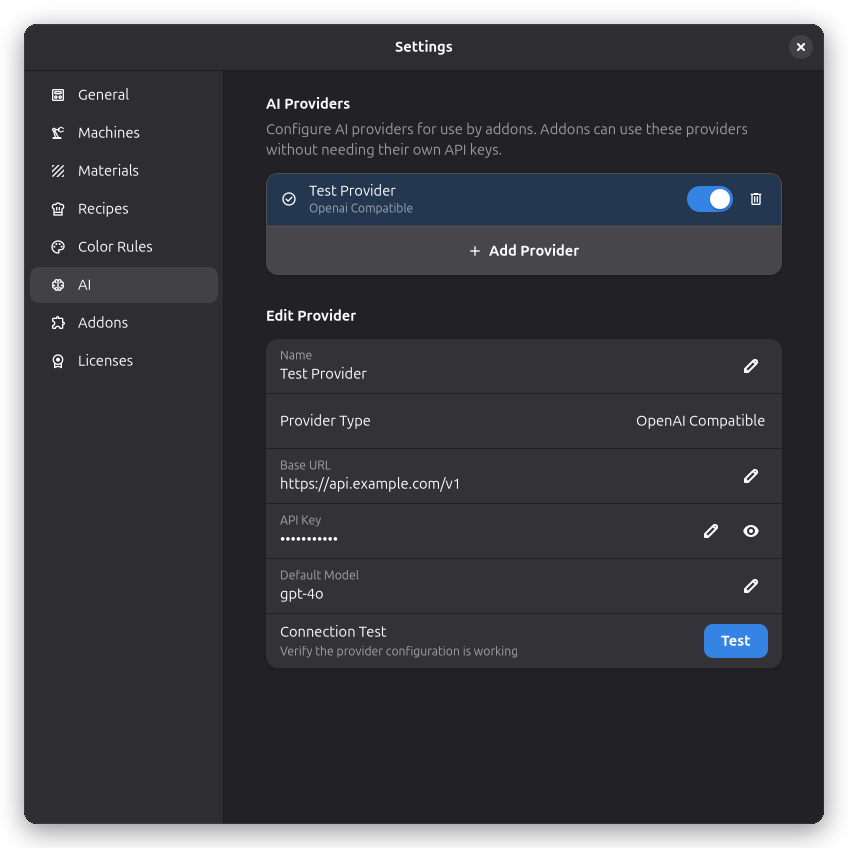
Configure AI providers that addons can use to add intelligent features to Rayforge.
How It Works
Addons can leverage configured AI providers without needing their own API keys. This centralizes your AI configuration and lets you control which providers are available to addons.
Adding a Provider
- Click Add Provider to create a new provider configuration
- Enter a Name to identify this provider
- Set the Base URL to your AI service's API endpoint
- Enter your API Key for authentication
- Specify a Default Model to use with this provider
- Click Test to verify your configuration works
Provider Types
OpenAI Compatible
This provider type works with any service that uses the OpenAI API format. This includes various cloud providers and self-hosted solutions.
The default base URL is set to OpenAI's API, but you can change it to point to any compatible service.
Managing Providers
- Enable/Disable: Toggle a provider on or off without deleting it
- Set as Default: Click the check icon to make a provider the default
- Delete: Remove a provider you no longer need
warning
Your API keys are stored locally on your computer and are never shared with third parties.