


Rayforge 1.13.0-beta1 - More Import Formats, a Dithering Engine, Rust GRBL by Default

The first beta of Rayforge 1.13 is here. This cycle is all about the moment your work enters and leaves Rayforge: opening almost any file your laser software might hand you, engraving it with a lot more control, and finishing the Rust GRBL migration. A lot of it came from the community.
Many More File Formats
Rayforge now opens Adobe Illustrator (.ai), EPS and PostScript files, HPGL plot files from
cutting plotters and CAD programs, GIF, TIFF and WebP bitmaps, and compressed SVG (.svgz,
Inkscape's "Compressed SVG"). AI files saved with PDF compatibility import like PDFs; EPS,
PostScript and older AI files are converted with Ghostscript, an optional dependency, with a clear
message when it is missing. Text becomes outlines and the EPS bounding box sets the page size.
This is the work of @switch87 (Gert Pellin) -- more on him below.
Reload and Relink Imported Sources
When an imported file changes on disk, Rayforge now notices. The File menu, the canvas and layer list context menus, and the asset browser gained Reload from Disk and Relink Source File. Reloading replaces a source's data in place and updates every workpiece made from it as one undo step, so your placement, layers, tabs and settings survive. Files can be marked for Auto-reload, and a General preference turns watching off entirely.
This pairs nicely with the new imports: EPS, PostScript and converted AI sources now remember the original file they came from, so "did this change?" still works after a conversion.
A Real Dithering Engine
Engraved photos got a serious upgrade. Rayforge ships eight error-diffusion kernels -- Atkinson, Stucki, Jarvis-Judice-Ninke, three Sierra variants and Burkes -- alongside the classic Floyd-Steinberg, plus an optional serpentine scan. For a different look there are two halftone screens: a round-dot Halftone and a clustered-dot Newsprint, each with an adjustable cell size and angle. If you import files from LightBurn, your dither mode now comes along for the ride.
The heavy lifting lives in raygeo, our Rust geometry library, so it stays fast even on large images. Also by @switch87.
The Rust GRBL Driver Is Now the Default
Rayforge 1.12 introduced the experimental "GRBL (Rust)" driver. Since then it has fully replaced the old Python implementation: the GRBL Serial driver runs its entire protocol stack -- handshake, character-counting flow control, job streaming, stall detection and deadlock recovery -- in Rust through the raydriver library, under the familiar name. Existing machine configurations keep working unchanged, and machines saved while the driver still carried its experimental name keep working too. The network driver also gained a proper FluidNC protocol variant.
Ruida Improvements
ruida-pa was updated to 0.22, adding TCP support for network connections alongside UDP. The setup wizard gained a connection mode selector (Auto, Network, USB) that shows only the fields that matter for the transport you pick, and there is a new Z homing mode to choose between a real Z home switch and the controller's auto-focus probe routine. @medoix fixed homing X and Y individually, and Sculpfun S30 owners will be glad the focus laser now works while the head is stationary -- with a new dedicated Sculpfun S9 profile alongside it.
Sketcher Booleans and Path Clean-Up
The sketcher gained boolean operations: Union, Difference, Intersection and Exclude bake the selected closed regions into proper multi-ring polygons (outer contours counter-clockwise, holes clockwise), so difference results cut correctly. The Sketch menu has a new Boolean section with shortcuts, and undo/redo brings the original entities and fills back (#398).
The Object menu and canvas context menu also gained path clean-up tools: Close Paths, Join Open Paths with a tolerance in mm, Delete Duplicates, and Break Apart, each a single undo step (#516).
Dashed Cuts with Perforation
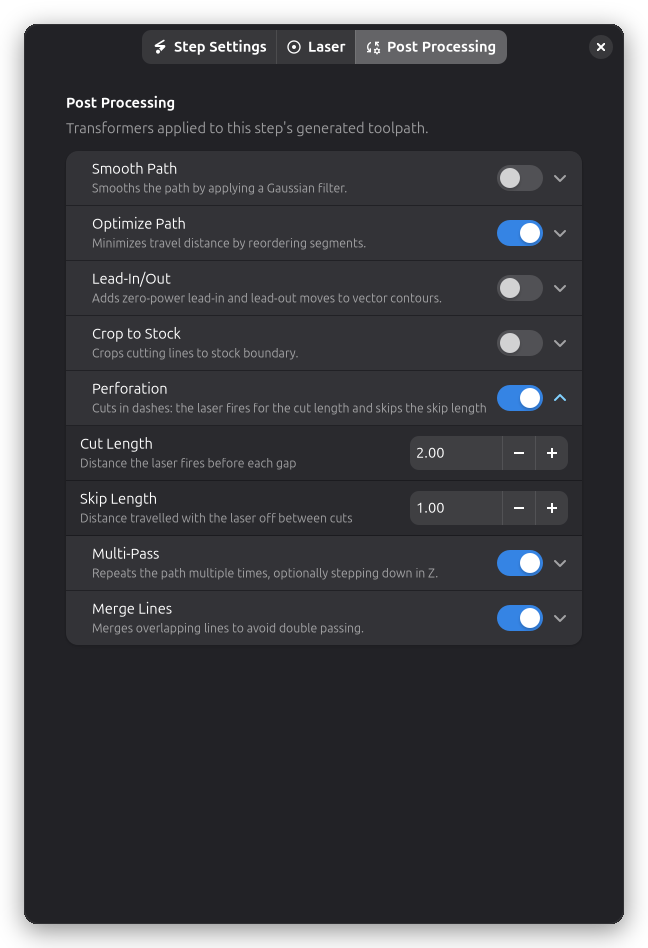
Not every cut is meant to free a part. A fold line, a tear-off ticket, or a stitch guide is often better weakened than cut through, and the new Perforation post-processor on Contour steps does exactly that: the laser fires for a Cut Length, travels a Skip Length with the laser off, and repeats the rhythm along every contour, restarting with a full cut at the start of each one. It is off by default, so it stays out of the way until you need it (#525, thanks to @switch87).
Cleaner Framing, Better Offsets, Sharper Estimates
- The Frame button now opens a popover with an Include Overscan Margin switch. Turn it off and the frame traces only the envelope the laser actually burns, so it no longer overshoots your artwork by the raster overscan margin (#563).
- A speed-dependent bidirectional scan offset table in the Advanced settings interpolates the raster offset for each step's speed, for lasers whose left-to-right/right-to-left skew grows with speed. A per-step offset still overrides the table (#307).
- Crop to Stock is now offered on Engrave steps, so raster content can be clipped to the stock boundary (#508).
- The running job ETA is derived from the modeled time remaining instead of the recent command speed, so it no longer collapses during buffered bursts or swings on jobs that mix fast and slow phases (#496).
- Full-sweep raster passes are limited to each scan line's own content extent (raygeo 1.66.0), so a shape that narrows in X -- an hourglass, say -- no longer sweeps the widest extent on every row (#565).
Camera and Convenience
- The camera view can now extend beyond the work area, with adjustable margins and border transparency (#543, thanks to @atkaper).
- macOS: adding a camera no longer crashes Rayforge. The app bundle declares its camera usage, and the first frame waits for the capture session to settle (#510).
- A new Mouse Gestures settings page rebinds 2D and 3D canvas and sketch-editor navigation gestures (#390).
- Image editing arrives as an addon: non-destructive edits stored per workpiece, with Invert
Image and Adjust Image (brightness, contrast, gamma, and an unsharp mask). Addons can
provide their own edits through the new
register_image_editshook (#515). - Step settings gained a Workpieces tab that shows exactly which workpieces a step processes, including the selection that generated content like the Material Test Grid used to hide.
- AppImage builds are attached to GitHub releases, and Rayforge is now on WinGet
(
winget install rayforge).
Bug Fixes and Polish
- On-canvas text is drawn through Pango instead of Cairo's toy font API, fixing garbled text and wrong sizes, especially for non-Latin languages (#507 -- thank you @atkaper)
- Disabling an addon now reliably removes its
action_extension_registryhandlers, even when several addons registered same-named handlers - The Engrave step's Bidirectional Scan Offset had no effect since the pipeline moved to raygeo intents; changing it now also refreshes the cached toolpath (#307)
- Choice rows backed by an enum (like the dithering algorithm) show the step's actual value when the dialog opens and after undo
- The Ruida setup wizard no longer requires the optional USB device and Magic fields (#501, #504)
- GRBL (Network): a new FluidNC protocol variant replaces the confusing "did not receive a valid HTTP response" error on ESP3D-style handshakes (#490)
- Zipping a device export no longer fails on 3D models that carry timestamps before 1980 (#500)
- The Sculpfun S30 focus laser uses constant power (M3), so it lights while the head is stationary (#512)
- Material test: resizing the workpiece no longer leaves the grid's cells and labels misaligned with the workpiece image until the next rebuild (#568)
This release was made possible with the support of our Patreon supporters: Build a CubeSat, DaveSys, froqstar, old-man-and-the-seam, pghpete, Derek McTavish, starlynx.dev, and six anonymous supporters.